Part 2 of taking a design org AI-first
In Part 1 I said design tools were always proxies. This is what we design in instead.
A workspace is one folder per feature. Everything about that feature lives in it: the brief, the inspiration, every decision, the flows, the prototype, the copy and the handoff. Code sits in the middle. Everything else points at it.
Six places, six truths
Think about where a feature lives today. The design file. The PRD. The specs. The tickets. A moodboard somewhere. And the Slack threads where the real decisions got made.
Six places. Six versions of the truth. And someone whose actual job is keeping them in sync, which nobody ever fully does.
That’s not a tooling problem. It’s a structure problem. As long as the work is split across artefacts, it drifts.
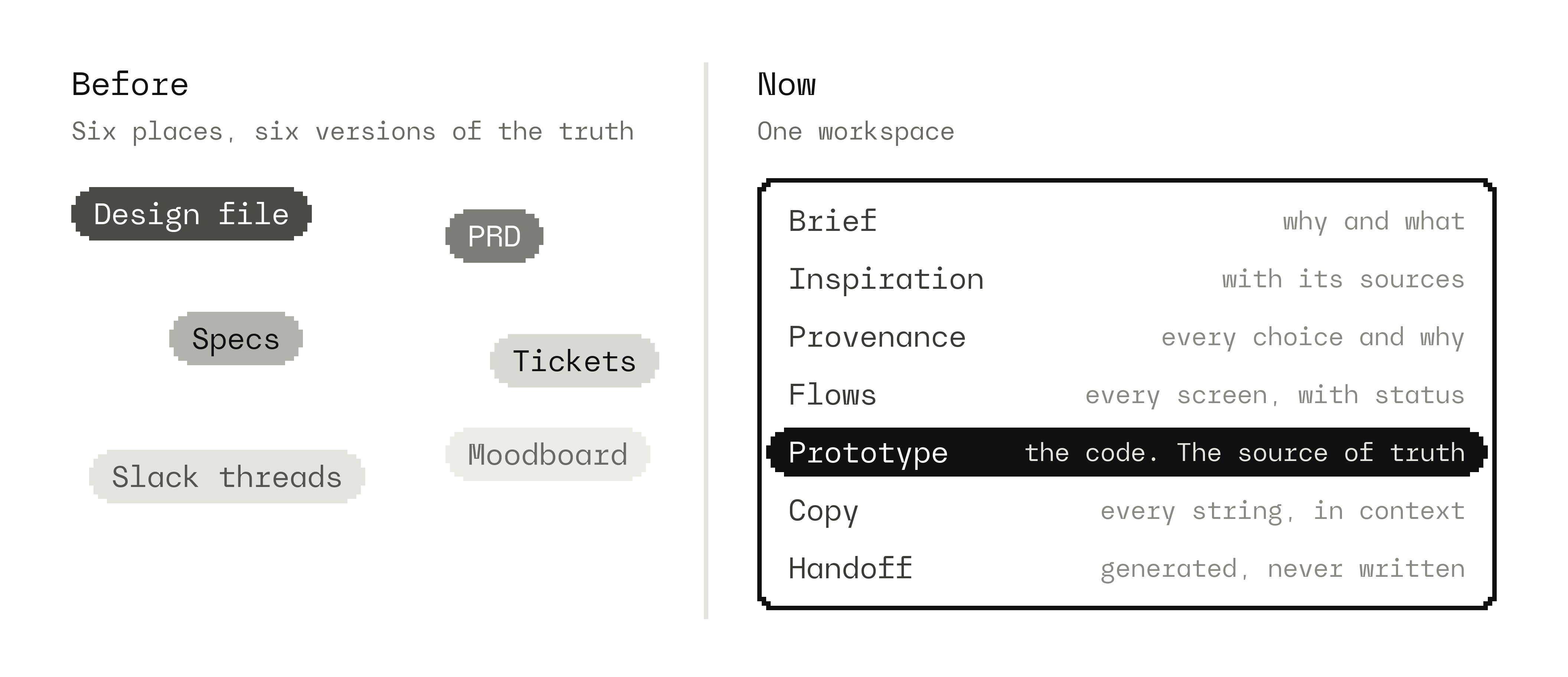
So we put it all in one place, and made code the thing in the middle. The engine starts every workspace with the same shape:
link-in-bio/
├─ .claude/        shared skills, rules and hooks
├─ .infinni/       engine settings and waivers
├─ brief/          problem, requirements, acceptance
├─ context/        decisions, research, glossary
├─ crit/           the latest crit of each screen
├─ design/         inspiration, input from any tool
├─ feedback/       reviewers' comments
├─ flows/          every screen, and the ways between
├─ prototype/      the code: the source of truth
├─ provenance/     every choice, and why
├─ reports/        check results
├─ specs/          the handoff, generated
├─ CLAUDE.md       points Claude at CONTEXT.md
├─ CONTEXT.md      where Claude starts reading
└─ workspace.yaml  type, status, owners, pins
One engine
Game studios worked this out long ago. To make a big game, they first make the tools that make it. Artists, designers and programmers all work inside the studio’s own editor, built for the kind of game they make. What they build there is the game.
Guerrilla, the Dutch studio behind Killzone and Horizon, built its own engine. It shipped Killzone Shadow Fall in 2013, then grew into the open worlds of Horizon. In Horizon, artists paint the rules for a landscape, and the engine places every tree and bush to match as you play. Even the clouds have their own tool. Guerrilla’s technical director explained why they never licensed one: they want to be in charge of what they do next, and they had seen tools they relied on bought and shut down.
In 2016, after leaving Konami, Hideo Kojima toured studios looking for technology for his next game. Guerrilla shared its engine with him. Death Stranding was built on it, and Death Stranding 2 after it. The engine needed a name, so Guerrilla called it Decima, after Dejima, the island where the Dutch once traded with Japan. What stood out for Kojima’s team, their technical chief says, are tools made for big teams of different specialists to work in together.
Guerrilla says it built Decima to depend less on programmers, and to put as much control as it can in the hands of creatives.
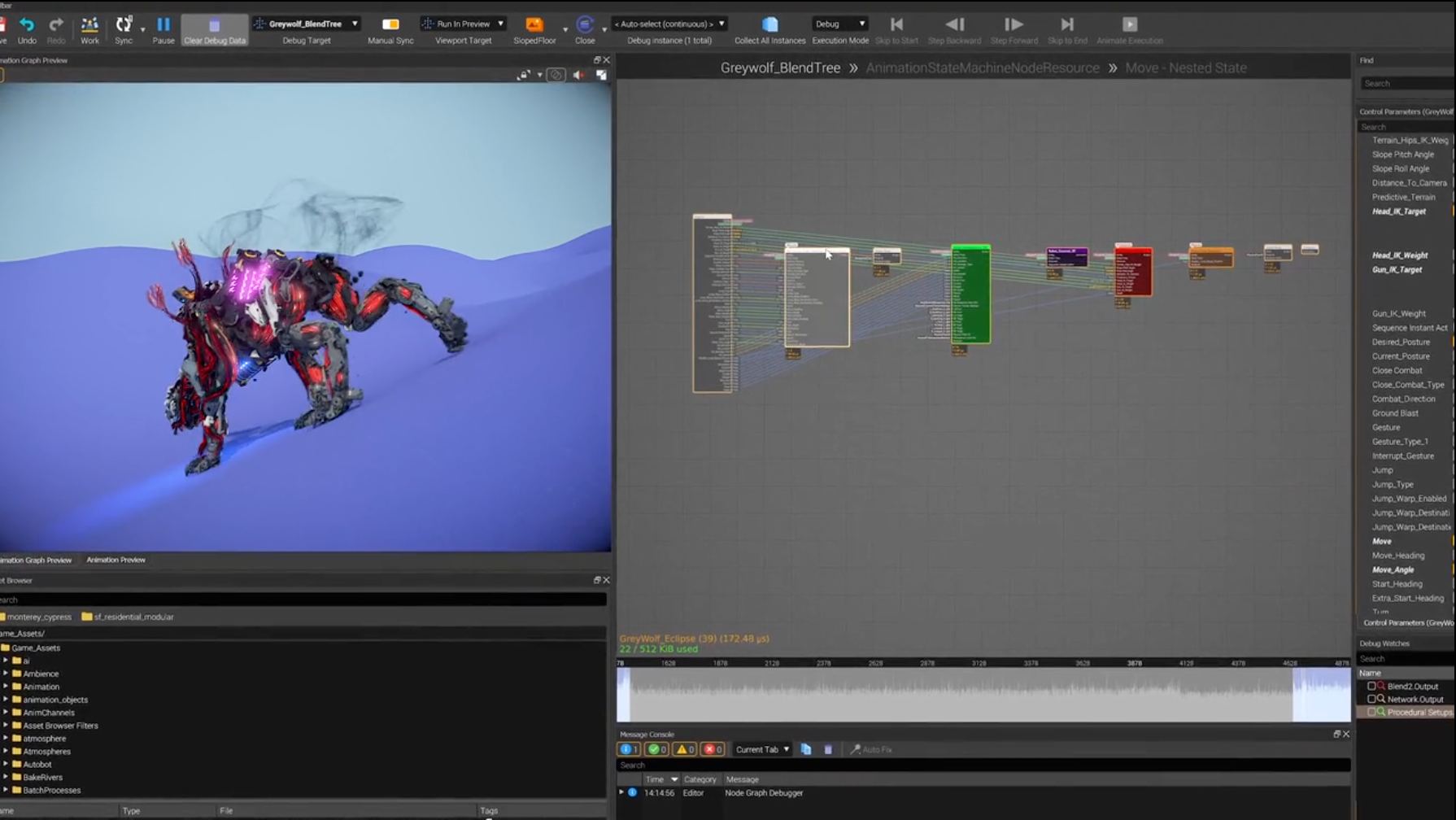
That’s what our engine is to a workspace. Every workspace runs on it: the app and its tabs, the checks, the Claude skills. Designers build the real thing in it, the way a level designer builds the real level. When a workspace needs something new, it asks for it in the engine. It never patches its own copy.
Studios have whole teams on their engine. We have one person.
Designers don’t open it
The first thing people assume: designers now live in a code editor. They don’t.
A designer opens Claude and says start a workspace for the link-in-bio page
. Claude sets it up and hands back a link. From then on it’s plain language. Save my work.
Send it for review.
Open the PM’s branch.
There are no commands to remember.
Under the hood it’s all Git. Branches, commits, pull requests. Claude runs it, signed in as the designer. They never clone a repo or type a command.
The workspace app itself has no chat. That’s deliberate. You prompt in your own Claude. The workspace is what you build, not where you talk.
A tour
Every workspace runs the same app. Six tabs.
Mood. Inspiration from real products, pulled by an agent on request. Every picture keeps its source.
Prototype. Not a mockup. The real UI, in code, built from the design system. It updates live while Claude works.
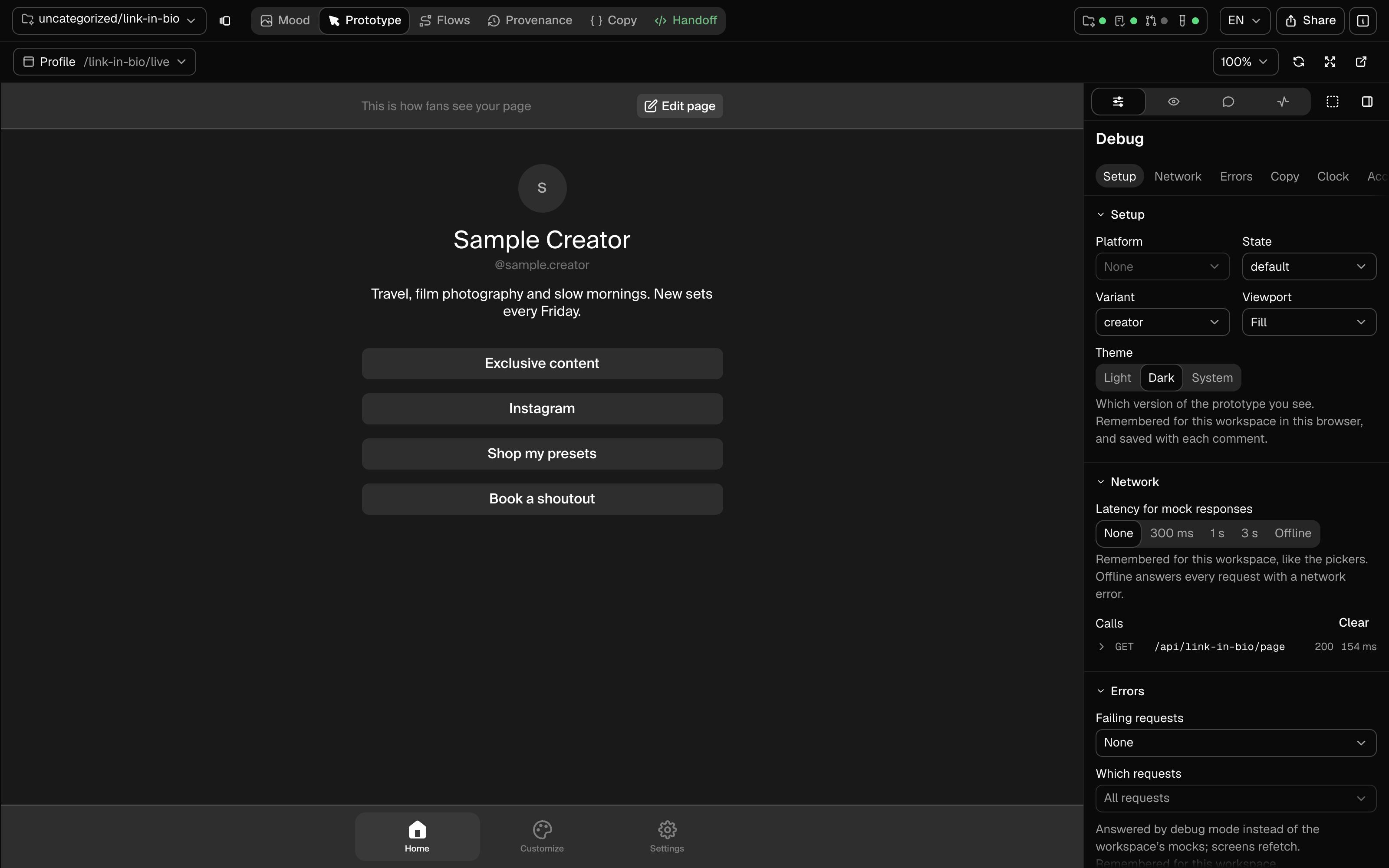
The Debug drawer is where it gets interesting. Switch the state. Slow the network to three seconds. Fail a request. Go offline. It’s a game’s debug menu, for a product. Designers used to skip the unhappy paths because nobody could see them. Now they’re two clicks away, so they get designed.
Flows. Every screen in the feature, including the ones nobody has designed yet. Those show as placeholders, so the flow is complete from day one. Each screen has a status: Pending, Building, Ready for dev. Ready can’t be claimed. A screen only gets there with a story, a test and approved copy, and a check confirms it.
Provenance. Every choice, inspiration and decision, in the designer’s own words, linked to the screens it shaped.
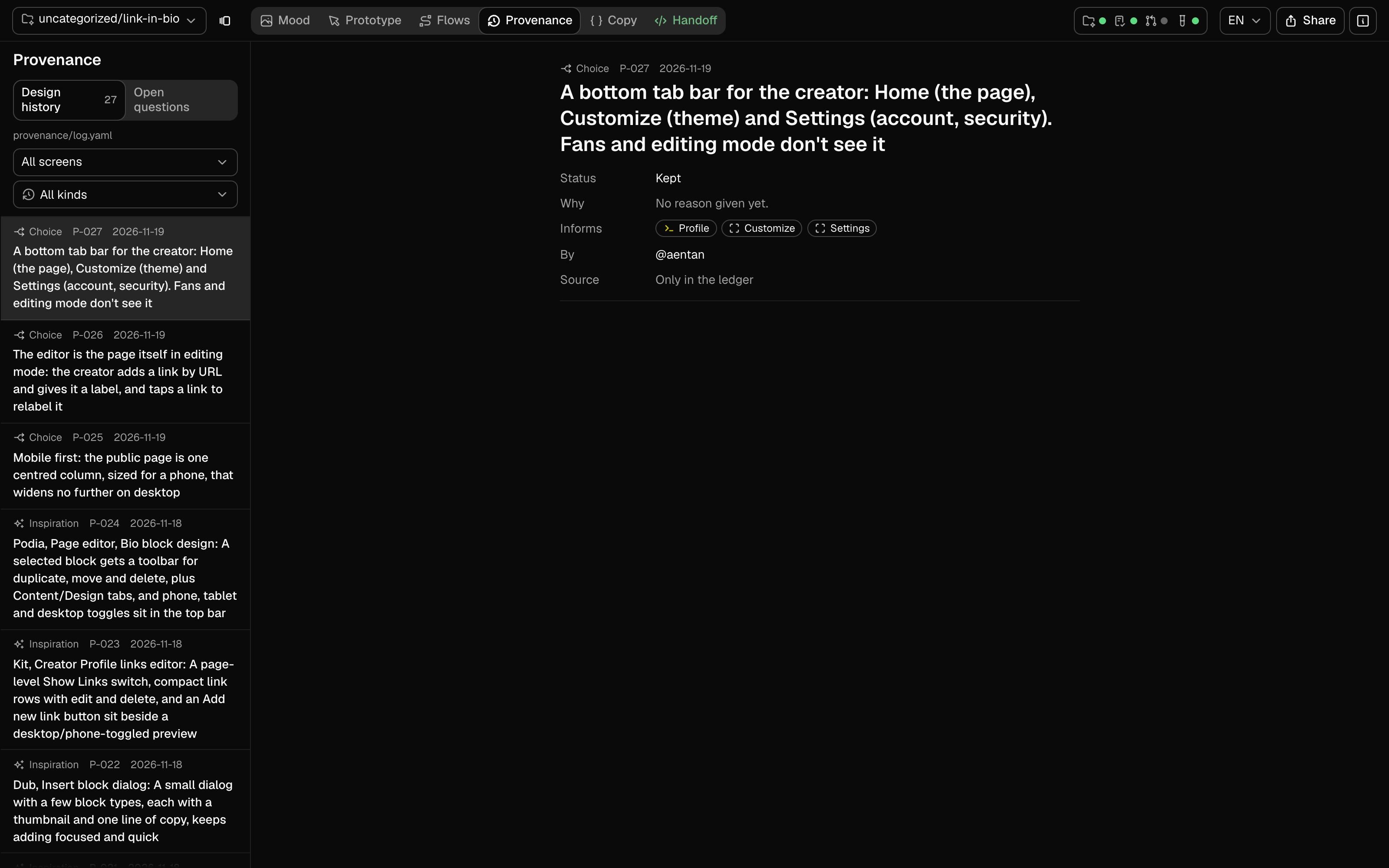
This is the tab I’m proudest of. “Why does it look like this?” used to live in someone’s head, and left when they did. Now it sits beside the screen, for every reviewer and every engineer who comes later.
Copy. Every string in the feature, edited in context. Our UX writer works here, with their own Claude, and proposes changes like anyone else. No copy decks. No pasting text into tickets.
Handoff. A spec, screen by screen, generated from the code and the flows.
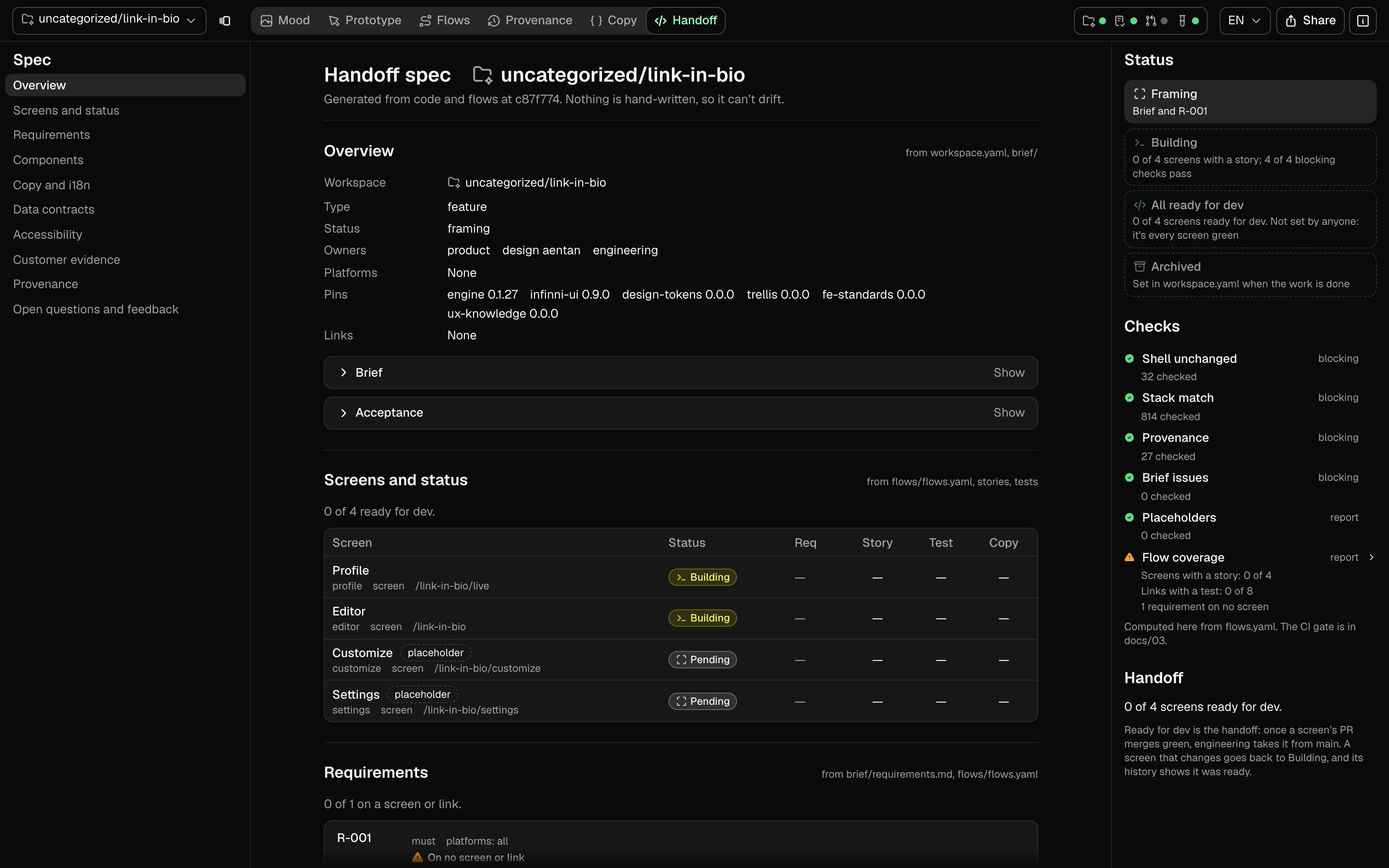
The page says it best: nothing is hand-written, so it can’t drift. A handoff used to be a document someone wrote at the end. Here it’s a view of what’s already true.
Sharing is a sentence
Save my work
pushes a work-in-progress branch. A PM asks their own Claude to open it, and clicks through the real thing on their own machine. No export. No “latest-final-v3”. No meeting to walk through it.
When it’s ready, send it for review
opens a pull request. An agent writes the summary, so the reviewer knows what to read and what to skip. The checks run. A person greenlights it. Nothing merges on an agent’s say-so.
Next up: comments right on the prototype. Click an element, leave a note, and it’s stored with the exact build, screen and state the reviewer saw. Claude can rebuild that view exactly. No more screenshots in threads.
What it asks of designers
This isn’t free. It asks designers to change how they think about the job.
- You ship code, not pictures. A design file is input, not the deliverable.
- You describe and judge. Claude does the typing.
- Share early, in small steps. Save before it’s perfect.
- A red check is a fact about the code, not a verdict on you.
- Write down why. If it shaped the design, it goes in provenance.
The last one is the hardest. Designers are used to the “why” being obvious to everyone in the room. A workspace outlives the room.
For other design leaders
Don’t give your designers a better design tool. Give them one place where the work lives, and put code in the middle of it.
Part 3: one shared brain.